Java Spring Hibernate Oracle Example
In this tutorial, we are going to explain how to configure a Spring project to work with Hibernate and perform database operations using Spring Framework such as -
In order to configure Spring Framework with Hibernate to perform database operations, we will use a very important template class provided by Spring Framework which allows us to use Hibernate to perform database operations , named - HibernateTemplate .
We are going to create a java class named Customer within the decodejava package and this class contains -
Besides this, we are also going to define a couple of getter and setter methods within this class to set the above mentioned properties of Customer class.
Next, we are going to add another Java class named CustomerDAO and it is going to contain two properties, such as -
This HibernateTemplate property will be assigned a value by the Spring Container using its setter methods, when the CustomerDAO bean is created by it using the configuration xml file(to be created in the upcoming section).
This class will contain separate methods to perform Hibernate operations using methods of Spring Framework template class HibernateTemplate, to perform JDBC queries such as -
- Creating a table in database,
- Inserting records in a table,
- Getting all the records from a database table,
- Getting the total count of all the records from a database table, and,
- Finally deleting a record from the same database table.
package decodejava; import java.util.List; import org.springframework.orm.hibernate5.HibernateTemplate; import org.springframework.transaction.annotation.Transactional; public class CustomerDAO { private HibernateTemplate hibernateTemplate; //Getter for HibernateTemplate public HibernateTemplate getHibernateTemplate() { return hibernateTemplate; } //Setter for HibernateTemplate public void setHibernateTemplate(HibernateTemplate hibernateTemplate) { this.hibernateTemplate = hibernateTemplate; } //Adding a customer @Transactional public void addCustomer(Customer c) { hibernateTemplate.save(c); } //Deleting a customer @Transactional public void deleteCustomer(int id) { Customer c=hibernateTemplate.get(Customer.class,id); hibernateTemplate.delete(c); } //Extracting a count of all the customers public int countCustomer() { List<Customer> list =hibernateTemplate.loadAll(Customer.class); return list.size(); } //Getting a List of all customers from database public List<Customer> getAllCustomer() { List<Customer> list =hibernateTemplate.loadAll(Customer.class); return list; } } Note : In the above mentioned DAO class, an important Spring Framework's annotation i.e. @Transactional is used and placed just before the methods i.e. addCustomer(Customer c) and deleteCustomer(int id) used to perform database transactions such as - insertion and deletion of records in the database.
Advertisement
Adding the Utility class that calls the Spring API
Next, we are going to create another class named - Utility, which is a simple java class.
Utility.java
package decodejava; import java.util.List; import org.springframework.context.ApplicationContext; import org.springframework.context.support.FileSystemXmlApplicationContext; public class Utility { public static void main(String[] args) { ApplicationContext context = new FileSystemXmlApplicationContext("classpath:config.beans.xml"); CustomerDAO customerDAO = context.getBean("CustomerDAOBean",CustomerDAO.class); System.out.println("Adding the customers"); customerDAO.addCustomer(new Customer(1, "First Customer", "First Address", 23)); customerDAO.addCustomer(new Customer(2, "Second Customer", "Second Address", 27)); customerDAO.addCustomer(new Customer(3, "Third Customer", "Third Address", 21)); System.out.println("Getting all the customers from the database"); List<Customer> allCustomers = customerDAO.getAllCustomer(); for(Customer cust : allCustomers) { System.out.println("Customer ID : " + cust.getId()); System.out.println("Customer Name : " + cust.getName()); System.out.println("Customer Address : " + cust.getAddress()); System.out.println("Customer Age : " + cust.getAge()); } System.out.println("Getting the total count of all the Customers"); System.out.println("Total Customers : " + customerDAO.countCustomer()); System.out.println("Deleting a Customer"); customerDAO.deleteCustomer(2); System.out.println("Getting the new total count of all the Customers after deleting a customer"); System.out.println("Total Customers : " + customerDAO.countCustomer()); } } The Utility class uses the ApplicationContext container(an interface) of Spring Framework by creating its instance using its implemented class FileSystemXmlApplicationContext, which loads the configuration xml file - config.beans.xml and does the following -
- Reads XML to create the CustomerDAO bean named CustomerDAOBean and initiate its property hibernateTemplate with a value by calling its setter methods i.e. setHibernateTemplate().
- Using CustomerDAOBean, the method of CustomerDAO class is called i.e. createTable(), to create a table in database.
- Using CustomerDAOBean the method of CustomerDAO class is called i.e. addCustomer(int id, string name, string address, int age), to add a customer to the database table.
- Using CustomerDAOBean the method of CustomerDAO class is called i.e. getAllCustomer(), to get a List of all the customer stored in the database table.
- Using CustomerDAOBean the method of CustomerDAO class is called i.e. countCustomer(), to get a total count of all the customer records stored in the database.
- Using CustomerDAOBean the method of CustomerDAO class is called i.e. deleteCustomer(int id), to delete a customer record by using its id value.
Mapping Document for Customer.java
This mapping document is essentially required by Hibernate to map the Customer class and its instance variables/properties to a database table and its columns.
This mapping document tells Hibernate -
- The name of the class to be mapped to a database table.
- The name of the database table to be created.
- The specific field, which is to be made the primary key in this table.
- The data-type of each property in the class, which is going to mapped to a column in a table.
This mapping document ends with an extension .hbm.xml, hence, we have named it customer.hbm.xml .
customer.hbm.xml
<?xml version = "1.0" encoding = "utf-8"?> <!DOCTYPE hibernate-mapping PUBLIC "-//Hibernate/Hibernate Mapping DTD//EN" "http://www.hibernate.org/dtd/hibernate-mapping-3.0.dtd"> <hibernate-mapping> <class name = "decodejava.Customer" table = "customer"> <id name = "id" column = "Id" type = "int"> <generator class="native"/> </id> <property name = "name" column = "Name" type = "string"/> <property name = "address" column = "Address" type = "string"/> <property name = "age" column = "Age" type = "int"/> </class> </hibernate-mapping> This mapping document has <hibernate-mapping> as the root element and its child element <class>, containing all the class elements.
- The name attribute within the <class> element defines the name of the class to be mapped to a database table.
- The table attribute within the <class> element defines the name of database table to be created for the class in the database i.e. customer.
- The id element maps a property within the class to the primary key of the database table.
- the name child attribute refers to the name of a property in the class.
- The column child attribute refers to name of a column in the database table.
- The type child attribute specifies the data type of the property within the class, which will be mapped to SQL data type.
- The property element maps a property within the class to a column in the database table.
- the name child attribute refers to the name of a property in the class.
- The column child attribute refers to the column name in the database table.
Adding a configuration file
Next, we are going to add a configuration file to our project. This configuration document is an Extensible Markup Language(XML) file, ending with .xml extension and we are going to name file as config.beans.xml.
In this file, we have configured a CustomerDAO bean with a unique id and with its HibernateTemplate property named hibernateTemplate. This properties will be assigned a value by the Spring Container using their respective setter methods, when the CustomerDAO bean is created by it using the configuration xml file.
config.beans.xml
<?xml version="1.0" encoding="utf-8"?> <beans xmlns="http://www.springframework.org/schema/beans" xmlns:xsi="http://www.w3.org/2001/XMLSchema-instance" xmlns:util="springframework.org/schema/util" xmlns:context="http://www.springframework.org/schema/context" xmlns:tx="http://www.springframework.org/schema/tx" xsi:schemaLocation="http://www.springframework.org/schema/beans http://www.springframework.org/schema/beans/spring-beans.xsd http://www.springframework.org/schema/context https://www.springframework.org/context/spring-context.xsd http://www.springframework.org/schema/tx http://www.springframework.org/schema/tx/spring-tx-4.1.xsd "> <bean id="CustomerDAOBean" class="decodejava.CustomerDAO"> <property name="hibernateTemplate" ref="hibernateTemplateBean"></property> </bean> <bean id="hibernateTemplateBean" class="org.springframework.orm.hibernate5.HibernateTemplate"> <property name="sessionFactory" ref="SessionFactoryBean"></property> </bean> <tx:annotation-driven transaction-manager="txManagerBean"/> <bean id="txManagerBean" class="org.springframework.orm.hibernate5.HibernateTransactionManager"> <property name="sessionFactory" ref="SessionFactoryBean"></property> </bean> <bean id="SessionFactoryBean" class="org.springframework.orm.hibernate5.LocalSessionFactoryBean"> <property name="dataSource" ref="dataSourceBean">&t;/property> <property name="mappingResources" value="customer.hbm.xml"></property> <property name="hibernateProperties"> <value> hibernate.hbm2ddl.auto=create hibernate.dialect=org.hibernate.dialect.Oracle10gDialect hibernate.show_sql=true hibernate.default_schema=system </value> </property> </bean> <bean id="dataSourceBean" class="org.springframework.jdbc.datasource.DriverManagerDataSource"> <property name="url" value="jdbc:oracle:thin:@localhost:1521:XE"></property> <property name="driverClassName" value="oracle.jdbc.driver.OracleDriver"></property> <property name="username" value="scott"></property> <property name="password" value="tiger"></property> </bean> </beans> This mapping document has a parent <beans> tag as the root element and its individual child elements, each with a <bean> tag, containing all the attributes such as -
- The id attribute within the <bean> element defines a unique id associated with the bean.
- The class attribute within the <bean> element defines the name of the class of this bean.
- The name child attribute refers to the name of a property in the CustomerDAO class i.e. hibernateTemplate.
- The value child attribute refers to the value assigned to be a specific property
- The ref child attribute refers to the reference name of a property which is matched with the id of another bean declared in this configuration file within another <bean> tag.
For example - ref="hibernateTemplateBean" refers to a HibernateTemplate bean with id having a similar value - hibernateTemplateBean, declared in this configuration file, to initiate the HibernateTemplate object.
A tag <tx:annotation-driven> is provided by Spring Framework to provide the transactional support, which allows to perform the transactions such as inserting, updating, deleting records from database. This tag has a property -
- transaction-manager - This property is used to specify the name of transaction manager bean, which is matched with the id of another bean declared in this configuration file within another <bean> tag.
This SessionFactory bean has two properties -
- datasource - This property refers to a data source implementation class declared in this configuration file.
- mappingResources - This property refers to a hibernate configuration file named - customer.hbm.xml, used to map the objects of Customer class to database using Hibernate with Spring.
- The Connection URL
- The driverClassName
- The username
- The password to connect to the database and perform JDBC operations using Hibernate with Spring Framework.
The datasource property refers to the class provided by Spring Framework - DriverManagerDataSource, used to access the configuration database details specified in xml file, such as -
Adding JARs
- We are going to add some JARs files to our Java project, such as -
- The JARs are associated with the Spring Framework.
- The JARs associated with the Hibernate ORM.
- The JAR file associated with the JDBC to work with our Oracle database.
- All these JARs associated with the Spring Framework are included in its installation folder named libs(within our Spring installation folder). So, we need to add all the JARs in the libs folder to our build path of our Java project.
- Next, we are going to add some more JARs files to the build path of our Java project. These JARs make the Hibernate work with our database using a specific JDBC Driver for our particular database.
All these JARs are included in the folder named required(within our Hibernate installation folder). So, we need to add all the JARs in the required to our build path of our Java project.
- Finally, we are going to add one more JAR file. This is a specific JDBC JAR file(ojdbc14.jar) required by Hibernate to connect to our database(Oracle Express Edition 10g) and perform object-relational mapping and object persistence.
Note : Those who don't know how to add JARs to the build path of your Java project in Eclipse IDE, please refer to our section Adding JARs to your Spring project in Eclipse.
Note : Those who don't know how to add JARs to the build path of your Java project in Eclipse IDE, please refer to our section Adding JARs to your Hibernate project in Eclipse.
Directory Structure of Project
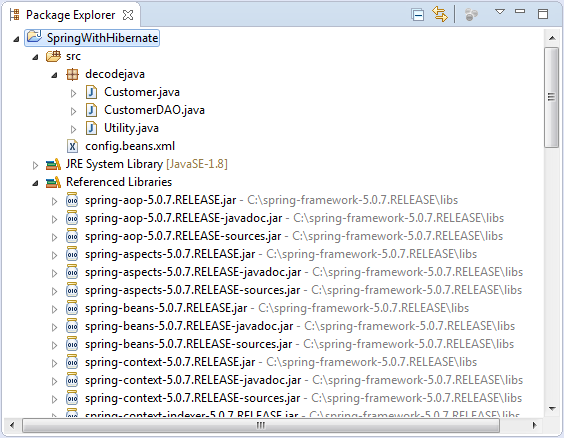
The picture above depicts how and where to arrange classes and interfaces comprising this Spring Project, in a specific directory structure.
Project Folder - SpringWithHibernate is the name of our Project and it is a top-level directory.
- This project folder contains a package of our project i.e. decodejava containing three classes -
- A POJO class named Customer.java.
- Another POJO class named CustomerDAO.java class.
- A class that calls the Spring Framework into action i.e. Utility.java.
- Besides this, the project folder also contains a configuration file i.e. config.beans.xml, used to configure the beans of classes in the project.
- The project folder also contains all the needed Spring JARs present in the libs folder of Spring Framework installation.
Execution
Finally, after executing Utility class, you will get the following output within the Console window. This output shown below, shows how the Utility class has used the ApplicationContext container of Spring Framework to load the configuration xml file - config.beans.xml , access the beans specified in it, instantiate the CustomerDAO class and performs JDBC operations by calling the methods of CustomerDAO class using Hibernate with Spring Framework.Jul 31, 2018 1:39:30 PM org.springframework.context.support.AbstractApplicationContext prepareRefresh INFO: Refreshing org.springframework.context.support.FileSystemXmlApplicationContext@26f0a63f: startup date [Tue Jul 31 13:39:30 2018]; root of context hierarchy Jul 31, 2018 1:39:30 PM org.springframework.beans.factory.xml.XmlBeanDefinitionReader loadBeanDefinitions INFO: Loading XML bean definitions from class path resource [config.beans.xml] Jul 31, 2018 1:39:31 PM org.springframework.jdbc.datasource.DriverManagerDataSource setDriverClassName INFO: Loaded JDBC driver: oracle.jdbc.driver.OracleDriver Jul 31, 2018 1:39:32 PM org.hibernate.Version logVersion INFO: HHH000412: Hibernate Core {5.2.17.Final} Jul 31, 2018 1:39:32 PM org.hibernate.cfg.EnvironmentINFO: HHH000206: hibernate.properties not found Jul 31, 2018 1:39:34 PM org.hibernate.annotations.common.reflection.java.JavaReflectionManager INFO: HCANN000001: Hibernate Commons Annotations {5.0.1.Final} Jul 31, 2018 1:39:34 PM org.hibernate.dialect.Dialect INFO: HHH000400: Using dialect: org.hibernate.dialect.Oracle10gDialect Hibernate: create sequence system.hibernate_sequence start with 1 increment by 1 Hibernate: create table system.customer (Id number(10,0) not null, Name varchar2(255 char), Address varchar2(255 char), Age number(10,0), primary key (Id)) Jul 31, 2018 1:39:36 PM org.hibernate.tool.schema.internal.SchemaCreatorImpl applyImportSources INFO: HHH000476: Executing import script 'org.hibernate.tool.schema.internal.exec.ScriptSourceInputNonExistentImpl@60921b21' Jul 31, 2018 1:39:37 PM org.springframework.orm.hibernate5.HibernateTransactionManager afterPropertiesSet INFO: Using DataSource org.springframework.jdbc.datasource.DriverManagerDataSource@771db12c of Hibernate SessionFactory for HibernateTransactionManager Adding the customers Hibernate: select system.hibernate_sequence.nextval from dual Hibernate: insert into system.customer (Name, Address, Age, Id) values (?, ?, ?, ?) Hibernate: select system.hibernate_sequence.nextval from dual Hibernate: insert into system.customer (Name, Address, Age, Id) values (?, ?, ?, ?) Hibernate: select system.hibernate_sequence.nextval from dual Hibernate: insert into system.customer (Name, Address, Age, Id) values (?, ?, ?, ?) Getting all the customers from the database Jul 31, 2018 1:39:37 PM org.hibernate.internal.SessionImpl createCriteria Hibernate: select this_.Id as Id1_0_0_, this_.Name as Name2_0_0_, this_.Address as Address3_0_0_, this_.Age as Age4_0_0_ from system.customer this_ Jul 31, 2018 1:39:37 PM org.hibernate.internal.SessionImpl createCriteria Customer ID : 1 Customer Name : First Customer Customer Address : First Address Customer Age : 23 Customer ID : 2 Customer Name : Second Customer Customer Address : Second Address Customer Age : 27 Customer ID : 3 Customer Name : Third Customer Customer Address : Third Address Customer Age : 21 Getting the total count of all the Customers Hibernate: select this_.Id as Id1_0_0_, this_.Name as Name2_0_0_, this_.Address as Address3_0_0_, this_.Age as Age4_0_0_ from system.customer this_ Total Customers : 3 Deleting a Customer Hibernate: select customer0_.Id as Id1_0_0_, customer0_.Name as Name2_0_0_, customer0_.Address as Address3_0_0_, customer0_.Age as Age4_0_0_ from system.customer customer0_ where customer0_.Id=? Hibernate: delete from system.customer where Id=? Getting the new total count of all the Customers after deleting a customer Hibernate: select this_.Id as Id1_0_0_, this_.Name as Name2_0_0_, this_.Address as Address3_0_0_, this_.Age as Age4_0_0_ from system.customer this_ Total Customers : 2 And, this concludes configuring Spring Framework with Hibernate ORM .
Please share this article -
Advertisement
The property child element in <bean> tag refers to a property within the CustomerDAO class.
Source: https://www.decodejava.com/spring-with-hibernate.htm
0 Response to "Java Spring Hibernate Oracle Example"
Post a Comment